How to Cancel Your Subscription

You can cancel your subscription at any time through your account settings. To avoid further charges, we would recommend cancelling the subscription before your next renewal date. 

Kindly note the following upon cancellation:

  • For users on a monthly subscription, cancellation can be made at any time from within the account settings. The Service will remain active until the end of the prepaid monthly term, after which it will not renew. No refunds or partial credits are provided for monthly subscriptions, including for unused portions of your plan.

  • For users on an annual subscription, cancellation can be made at any time from within the account settings. The Service will remain active until the end of the prepaid annual term, after which it will not renew. No refunds or partial credits are provided for annual subscriptions, including for unused portions of your plan.

We recommend reviewing this information before cancelling to ensure it aligns with your needs.

Here is our guide for how you can cancel the subscription from your end:

1. Select your Account and the “Plan and Billing” section:

2. Scroll down and select “Manage Account”:

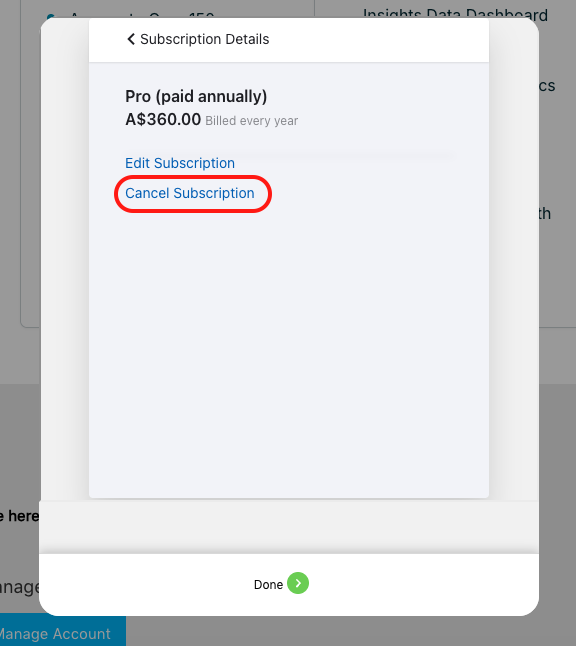
3. Select your current plan and in the next pop-up, select Cancel subscription:

4. You’ll be able to see the cancellation take effect on your next immediate renewal date for both monthly or annual subscriptions.

To proceed, a cancellation reason must be selected from the dropdown (optional: if you’d like to provide more feedback, you can also do so in the space provided below). From there, select Confirm Cancellation.

On the next pop-up, select Confirm:

5. Your subscription is now scheduled for automatic cancellation on your next renewal date. To undo this or continue your subscription upon your renewal, simply select Remove Scheduled Cancellation: