Management of users is available to both Account Managers and Supervisors within a Practice Plan. This feature allows you to add new team members, adjust their roles, monitor usage, and keep your practice account organised.
From the top navigation bar, click on Account located in the top right of your screen.
When in your account In the left-hand menu, select Users.
You will now see the User Management screen (shown below)
The User Management screen provides a full list of all users in your Practice Plan, including key details for each:
Name and Email – identifies the user.
Role – either Account Manager, Supervisor, or Practitioner.
Plan – the plan the user is on (e.g., Psychometrics, Pro, Pro Plus, Platinum).
Pro Actions – the number of Pro Actions a user has completed in the current calendar month.
On this screen, you can perform the following actions:
Click Add User.
Enter the required details (name, email, role, and plan).
Click Save. The new user will receive an invitation email.
Find the user you want to edit.
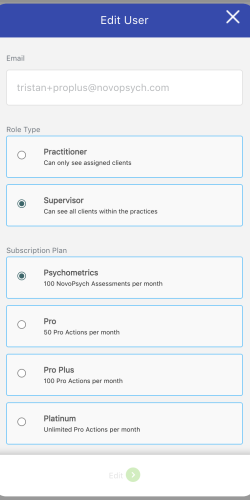
Click the Edit button (pencil icon).
Update their role or plan.
If you upgrade a practitioner to a higher plan you will be charged the pro rata amount for the remainder of your current billing cycle
Click Save to confirm changes.
Locate the user to remove.
Click the Delete button (bin/trash icon).
Confirm the deletion. ( Note: Deleted users lose access immediately. Their historical data remains securely stored.)
You can decide whether your users are able to access NovoNote AI Scribe.
In the Account Management section, you’ll see a setting labelled:
“Block access to NovoNote AI Scribe for users on a Psychometrics plan.” (See image below)
If allowed: When a user on the Psychometrics plan uses NovoNote AI Scribe, their plan will be automatically upgraded to Pro.
This gives you control to prevent unexpected upgrades, while still ensuring practitioners who need access can use NovoNote.
If a practitioner exceeds their plan limits, they will be automatically upgraded to the correct plan, and you will be notified.
Each practitioner in your practice may be on a different plan, depending on their usage.
Practitioners using NovoNote AI Scribe must be on Pro Plan or higher
You can view all plans available within a practice plan account in more detail here.